

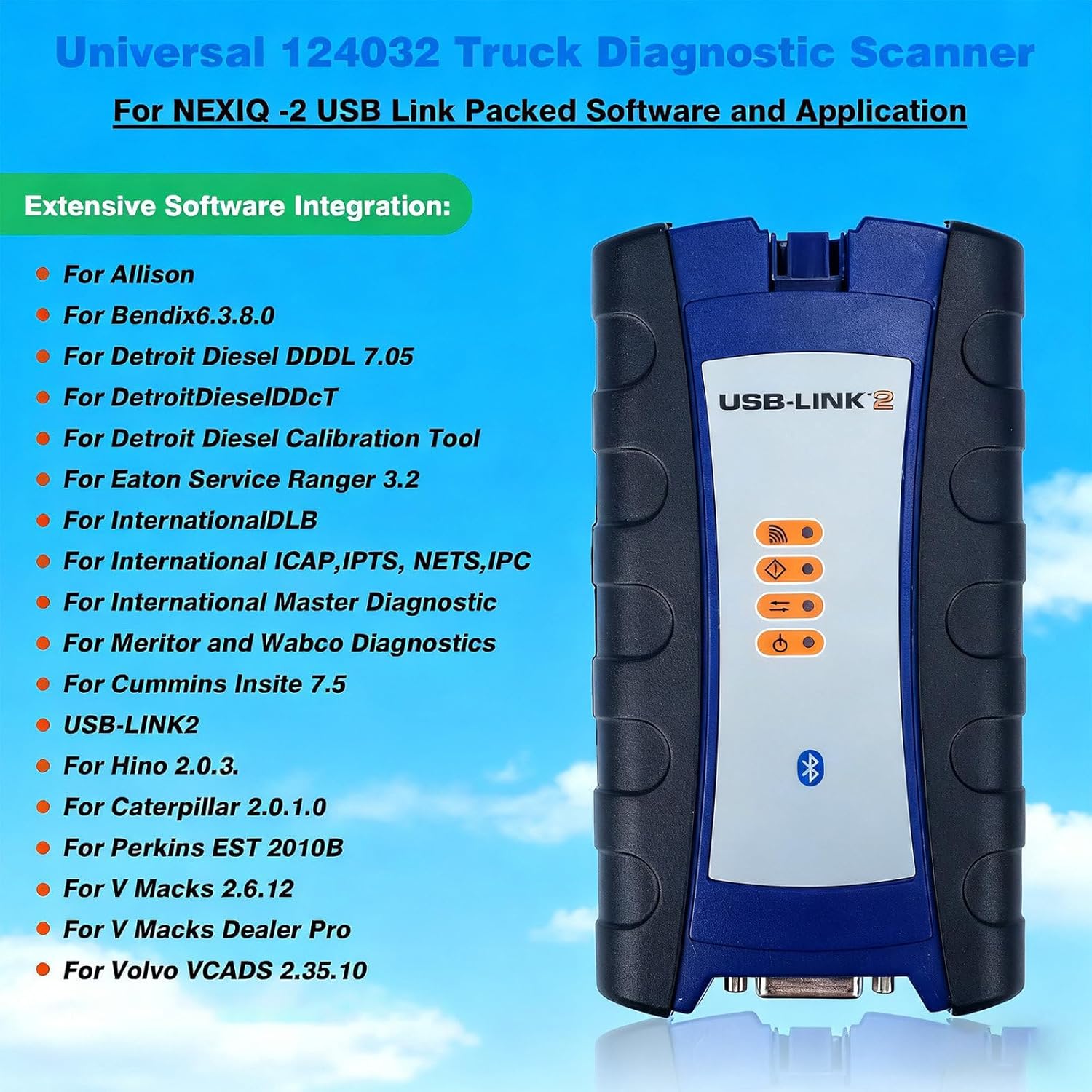
Diesel Universal Heavy Duty Truck Excavator Diagnostic Scanner Tool, Compatible with Diagnostic Programs for Engines, Transmissions, Instrument Panels, and Other Equipment Bluetooth
Product details
| Management number | 215318789 | Release Date | 2026/04/12 | List Price | $90.80 | Model Number | 215318789 | ||
|---|---|---|---|---|---|---|---|---|---|
| Category | |||||||||
Auto Diagnostic Tool - Multi-System Compatibility, USB Direct Connection, Portable DesignThis auto diagnostic tool meets diverse fleet maintenance and diagnostic needs, with reliable performance, broad compatibility and easy operation. It enables efficient vehicle data access for streamlined workflows via stable connection.Key Features- Multi-system Compatibility: Works with engines, transmissions, ABS, instrument panels, etc.- USB Direct Connection: Reduces programming time with fast, stable data transmission.- Mixed Fleet Support: Broad protocol compatibility for versatile fleet use.- Quick Data Access: Instant vehicle data for maintenance/management reports.- Easy Vehicle Connection: Fast attachment to diagnostic connector, simple setup.- Portable & Flexible: Lightweight, compatible with desktops and laptops.System RequirementsCompatible with Windows XP and Windows 7 (32-bit). Specific software requires XP; others work on Win 7. Important Installation & Usage Notes- Do not update; updating may damage the multiplexer.- Reinstall OS before CD software installation; otherwise, multiplexer may be damaged.- Laptop time adjustment may lock some software; use attached solution file to unlock.- Initial Check: Ensure Windows meets requirements; install components from "must_windows" on CD 1 if needed (WindowsInstaller 3.1, firmware 2.0/3.5, VB/VC++/JAVA for some interfaces).- Do not connect hardware during software/driver installation.- Disable antivirus before installation; allow registry access if prompted.- Driver Setup: Run "driver" folder setup on CD 1; use dedicated drivers for specific vehicles.- Some software cannot coexist on one PC; contact us for issues.- Diagnostic software needs registration; use included tool with video/image guides.Ideal for maintenance professionals and fleet managers, enhancing work efficiency. Follow installation/usage guidelines for best performance.
- Heavy Duty Truck Diagnostic Scanner with Multi-Brand Compatibility: This professional diagnostic tool is designed for heavy-duty commercial vehicles, construction machinery, and diesel engines. It works with applications that diagnose engines, transmissions, ABS, and instrument panels. The tool supports direct Bluetooth/USB connection for faster reprogramming, reducing downtime and improving maintenance efficiency
- Windows XP & 7 System: This diagnostic tool is optimized for Windows XP and Windows 7 (32-bit) systems. Specific applications for certain brands require installation on Windows XP, while others work on Windows 7. Before installing the included software, ensure your system has the necessary components, such as Windows Installer 3.1 and firmware updates, which are provided on the included CD. For best results, temporarily disable your antivirus software during installation to avoid conflicts
- Bluetooth/USB Dual Versions Optional for Flexible Usage Scenarios: Choose between Bluetooth and USB versions based on your needs. The Bluetooth version supports wireless connection, freeing you from cable restraints to move freely around the vehicle during diagnosis—ideal for large heavy-duty trucks or hard-to-reach diagnostic ports. The USB version offers stable wired transmission for faster
- Important Usage Notes: To keep your diagnostic tool in top condition, please note the following: do not update the device, as this can damage the multiplexer. If you change your laptop’s time, some software may lock; use the provided unlock guide to resolve this. Before installing the software, it is recommended to reinstall your computer system to prevent potential issues. The included software is compatible with Windows XP and 7 only, and is not compatible with original manufacturer software
- Reliable Customer Support & User-Friendly Design for Easy Operation: We provide professional customer support to assist with installation, driver setup, and any diagnostic issues you may encounter. The diagnostic tool features an intuitive design that allows both experienced technicians and beginners to operate easily—quickly attach to the vehicle’s diagnostic connector and access vehicle data in seconds for maintenance or management reports
| Brand Name | WLSLZQ |
|---|---|
| Unit Count | 1.0 Count |
| Item Weight | 4.63 Pounds |
| Manufacturer | WLSLZQ |




Correction of product information
If you notice any omissions or errors in the product information on this page, please use the correction request form below.
Correction Request Form